




How the Digital IMDG Code Works: Using the IMO ePublications Platform
How does the digital IMDG Code work? The digital IMDG Code is read on the IMO ePublications platform, IMO Publishing’s official online library. After you buy it, you activate an account and read the Code in a web browser. The full text is searchable, titles can be saved for offline use, and printing is allowed within set limits.
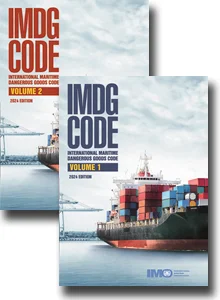
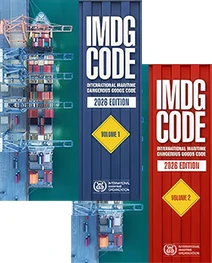
IMDG Code 2024 — available from Dandy Booksellers Australia
More customers are choosing the digital IMDG Code over the printed set, and the question that usually follows is a simple one: how does it actually work? This guide walks through the IMO ePublications platform from the customer’s side, from activating your account to reading, searching, saving for offline use and printing.
What the IMO ePublications Platform Is
The digital IMDG Code is not a file you download. It is read on the IMO ePublications platform, the official online library run by IMO Publishing.[ 1 ] The platform holds more than 600 IMO titles, the IMDG Code among them, grouped into book series, topics and collections.
Because the Code is read through the platform rather than as a PDF, you always open it in a web browser. That is what makes the digital edition fully searchable and keeps it current. It is also why the account and activation steps below matter, so it is worth getting those right first.
Getting Access: Activating Your Account
When you order the digital IMDG Code from Dandy Booksellers, we set up your account on the IMO ePublications platform and allocate the title to it. You do not have to register yourself.[ 2 ]
The platform then sends an activation email from sales@imo.org to the address on your order. Open that email and click the activation link. This activates your account and lets you set your password. If the email has not arrived within a short time, check your spam or junk folder, because automated messages often land there.
Once you log in, your purchased title sits in your account under My Profile, where your titles and subscriptions are listed. From there you open it and start reading. A customer who already has an account simply logs in, and the new title appears alongside anything bought before.
Reading the Code Online
With the account active, the IMDG Code opens in the platform’s reader, and there are two ways to read it.[ 2 ] The full text is available chapter by chapter in HTML, which is easy to scroll and works on a phone or tablet as well as a desktop. It includes a figure viewer for enlarging images and a table viewer for working through large tables. You can also open the Code in the PDF reader.
The real day-to-day benefit is search. A quick search box sits at the top of every page, and an advanced search lets you filter by date, subject, language and content type. Type a UN number or a proper shipping name and you go straight to the entry, instead of working through a printed index by hand.
Reading the Code Offline
Ships and port offices do not always have a reliable connection, so the platform lets you read purchased titles offline. The catch is that you have to save them while you are still online.[ 3 ]
To do it, open the title, click Read, and choose Save for offline viewing. The Code is then cached in that web browser. Saved titles are listed under My Profile, in the Offline Content area, so you can find them again.
Two things are worth knowing. The offline copy lives in the browser you saved it on, so it is not automatically available on your other devices. And because it sits in the browser cache, clearing your browsing data removes it, and you would need to save it again while online. The rule of thumb is simple: save the Code before you head somewhere without a connection, not after.
Printing Limits You Need to Know
The digital IMDG Code can be printed, but not without limit. Printing is capped at 10 pages per session, and at 50 pages per book in total.[ 3 ]
One point catches people out. When the print box appears, do not choose Print All. Selecting All uses up the entire 10-page session allowance in one go, whether or not you needed that many pages. Choose the current page, or type the exact page range you want. If your work means you print from the Code regularly, this limit is worth weighing against buying the printed set.
The Publications Certificate and Other Features
One feature is genuinely useful for ship operators. The platform generates a publications certificate that lists every title held on your account. It can be shown during a vessel inspection as evidence of the publications carried. For the certificate to be complete, the vessel’s IMO number has to be entered in the account profile, so it is worth filling that in when the account is set up.
The platform also keeps your receipts and invoices under My Orders, offers the entire Basic Documents series free so you can try the reader before buying, and has a newsletter that flags new editions and supplements. A resources area holds user guides, FAQs and short tutorial videos for anyone who wants to look further.
See also: IMDG Code Print or Digital: Which Format Works Best in Your Office?, and IMDG Code 2024: What It Is and Who Needs It.
Important: Regulations change frequently. Always verify operational requirements against the latest official IMO publication and against the applicable flag-state and national regulations. This article is intended as a general guide only and does not constitute legal or compliance advice.
Frequently Asked Questions
How do I access the digital IMDG Code after I buy it?
When you order through Dandy Booksellers, Dandy sets up your account on the IMO ePublications platform and allocates the title to it. The platform emails an activation link from sales@imo.org. Click it to activate your account and set a password. Your title is then in your account under My Profile. If the email does not arrive, check your spam folder.
Is the digital IMDG Code a PDF I can download?
No. It is read on the IMO ePublications platform through a web browser. There is no PDF file to download and keep, although the platform does include a PDF reader for viewing the Code on screen.
Can I read the digital IMDG Code offline?
Yes. Open the title and choose Save for offline viewing while you are online. It is cached in that web browser and listed under My Profile, in the Offline Content area. Clearing your browser data removes the saved copy, so save it again if that happens.
Can I print from the digital IMDG Code?
Yes, within limits. Printing is capped at 10 pages per session and 50 pages per book in total. Do not select Print All, because that uses the whole 10-page session allowance at once. Choose the current page or a specific page range instead.
What is the current edition of the IMDG Code?
The current edition is the IMDG Code 2024, Amendment 42-24. It became mandatory on 1 January 2026. The Code is amended every two years, so check the amendment before you order.[ 4 ]
Where can I buy the digital IMDG Code in Australia?
The digital IMDG Code is available from Dandy Booksellers Australia, including as a digital Code-and-Supplement pack. A printed two-volume set is also available if you would prefer a physical copy.
References
[ 1 ] IMO e-Publications platform — https://imo-epublications.org/
[ 2 ] IMO e-Publications — User Guides — https://imo-epublications.org/user-guides
[ 3 ] IMO e-Publications — Frequently Asked Questions — https://imo-epublications.org/faq
[ 4 ] IMO — IMDG Code — https://www.imo.org/en/publications/pages/imdg%20code.aspx
Related products

Free Delivery

Free delivery to all Australian and New Zealand mailing addresses.
Discounted E-books
For faster turnaround.
Download link via email within a couple of hours.
Information
 Home
HomeNew Products

Email us at sales@dandybooksellers.com.au
Australia
Dandy Booksellers
58 Allambi Avenue
Broadbeach Waters
4218 Queensland
United Kingdom
Dandy Booksellers Ltd
15 Hoopers Yard
Kimberley Road
London NW6 7EJ
Company registration number: 4846829



All prices in Australian Dollars (AUD)
